


Leveraging claude in sap successfactors
17 August 2026




Shyam Kumar
Associate Director, Applexus TechnologiesShyam Kumar is an Associate Director at Applexus with over 18 years of experience in SAP HCM and SAP SuccessFactors, backed by more than 10 years...
Claude in SuccessFactors: A New Phase
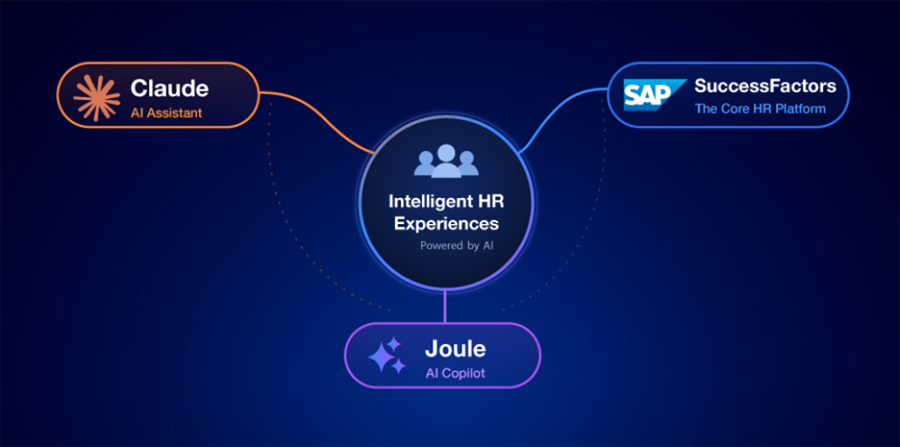
SAP Sapphire 2026, held on May 12, marked a major update for Joule, SAP's native AI assistant. SAP announced Claude as the primary reasoning and agentic engine behind Joule, running on the SAP AI Platform.
This update changes how Joule works inside SuccessFactors. Instead of responding to simple prompts, Joule handles multi-step HR requests, works with employee data based on user permissions, and completes tasks across business workflows.
For SuccessFactors teams, the focus shifts from AI announcements to practical impact. What changed inside Joule? What does Claude handle today? How does Claude access Employee Central data? What should implementation teams prepare before rollout?
What Actually Changed: Claude as Joule’s Reasoning Engine
SAP and Anthropic describe the architecture through three core layers.
Knowledge Graph grounding
Before Joule performs a task, Claude references SAP's Knowledge Graph. This structured model maps ERP and HCM entities, business relationships, workflows, and dependencies. The result is reasoning based on SAP business data instead of generic language model responses.
Model Context Protocol (MCP)
Claude-powered Joule agents connect with SuccessFactors, SAP S/4HANA, Ariba, and third-party applications through Model Context Protocol (MCP). MCP serves as Anthropic's open standard for connecting AI models with enterprise tools and data sources. SAP now supports this approach across its AI ecosystem.
SAP Business AI Platform
Joule agents run on SAP Business AI Platform, which includes SAP BTP, SAP Business Data Cloud, and SAP Business AI services. Existing authorization, compliance, and audit controls continue to govern every interaction.
Two implementation details that matter for HR teams.
SAP follows a multi-model AI strategy. Claude serves as the primary reasoning model, not the only model. Existing Joule configurations continue without replacement.
Every action still follows the SuccessFactors role-based permissions. Claude works within Employee Central authorization rules. No additional access paths exist.
Where Claude Appears Inside SuccessFactors
Employees interact with Claude through the existing Joule interface. The experience stays inside Employee Central, the SuccessFactors mobile application, and Microsoft 365 Copilot and Teams. Users do not need a separate application.
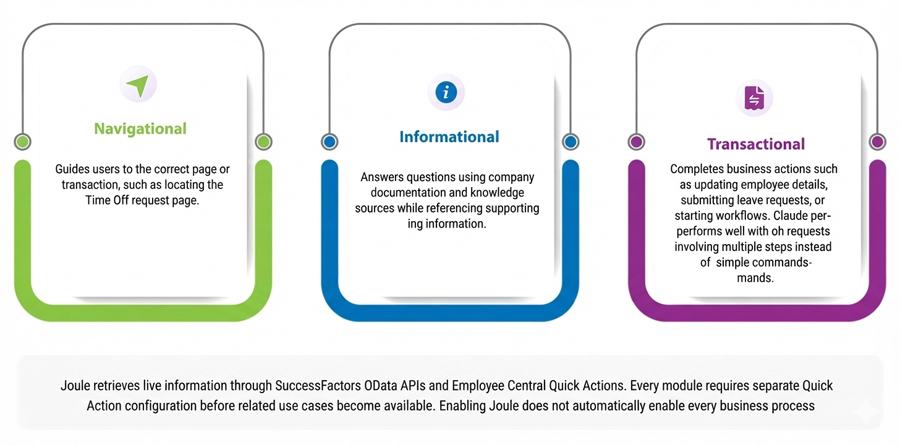
SAP groups Joule interactions into three categories.
Use Cases by Module
Module | Example Claude/ Joule Interaction | Value to HR |
Employee Central | Answers questions such as "What is my current cost center and who is my HRBP?" using live Employee Central data through OData and MCP. | Reduces self-service tickets and routine HR support requests. |
Time Off / Time Tracking | Processes requests such as "Apply three days of annual leave next week and notify my manager." | Removes multiple navigation steps for routine transactions. |
Recruiting | Screens resumes, ranks applicants, and prepares interview panel notes. | Speeds candidate shortlisting with documented reasoning. |
Succession and Development | Identifies critical roles without ready successors, reviews performance and skills data, and recommends development plans. | Supports continuous succession planning. |
Onboarding | Answers new hire questions and tracks onboarding tasks through conversation. | Improves the onboarding experience without increasing HR workload. |
Compensation | Explains compa-ratios and prepares compensation statement language. | Reduces routine compensation questions directed to HR Business Partners. |
Performance and Goals | Creates an initial performance review narrative using goals and employee feedback. | Saves manager time while keeping final decisions with people. |
Representative Joule and Claude use cases depend on licensing, deployed SuccessFactors modules, and Quick Action configuration.
Accessing SuccessFactors Data Directly from Claude
Joule is not the only integration option.
Technical teams also access SuccessFactors data directly through Claude for reporting, analytics, and internal AI applications. CData Connect AI provides a Remote MCP server that connects Claude with SuccessFactors without copying data into another database. Claude submits filtered and joined queries, which execute directly against SuccessFactors.
This approach serves a different audience. Analysts and technical teams ask questions such as, "Show headcount by cost center and identify unusual trends."
Keep these scenarios separate during project planning.
Use Joule for employee self-service inside SuccessFactors.
Use MCP connectors for reporting, analytics, and custom AI solutions outside the SuccessFactors interface.
Implementation Considerations for HR Technology Teams
Licensing and Prerequisites
Claude capabilities inside SAP Joule are delivered through SAP's Generative AI Hub on SAP Business Technology Platform using SAP AI Units. Organizations do not need a separate Claude license for standard Joule use cases.
Joule in SuccessFactors requires SAP AI Units and an SAP BTP Enterprise Global Account. Confirm licensing before planning a pilot.
NOTE: Verify whether your SAP data center supports Joule. Regional availability varies.
Configure Employee Central Quick Actions for every transactional scenario. This requires implementation work rather than a feature switch.
Governance, Security, and Audit
Treat the rollout like any production HR system change. Document the architecture, version control custom prompts and Joule Skills, and follow existing change management processes.
Define where Joule performs actions independently and where people approve decisions. Informational and navigational tasks carry lower risk. Compensation, termination, and compliance activities require human review.
Maintain audit records showing user requests, accessed data, and completed actions. These records support SOX, GDPR, and industry-specific compliance requirements.
Change Management
Employees continue using the same Joule interface. The improvement comes from better reasoning across complex requests instead of a new user experience.
HR Business Partners make a strong pilot group because their work covers varied HR scenarios and provides meaningful feedback during early deployment.
The Bottom Line
The SAP and Anthropic partnership improve the reasoning capabilities inside Joule rather than introducing a separate SuccessFactors product.
Implementation teams should focus on preparation. Confirm licensing, configure Quick Actions, establish governance, and define where AI acts independently versus where people make the final decision.
These steps determine whether better AI reasoning translates into faster HR processes while preserving security, compliance, and transparency.