


Reimagine Employee Experience with SAP SuccessFactors Work Zone
07 September 2026




Shyam Kumar
Associate Director, Applexus TechnologiesShyam Kumar is an Associate Director at Applexus with over 18 years of experience in SAP HCM and SAP SuccessFactors, backed by more than 10 years...
Introduction
Employee experience is now a business priority. Employees expect workplace systems to be as easy to use as the digital services they rely on every day. Multiple logins, disconnected applications, and time spent searching for information create friction in routine work.
SAP SuccessFactors Work Zone addresses this through a single, personalized workplace hub. Employees access HR services, business applications, communications, and communities from one place.
What Is SAP SuccessFactors Work Zone?
Work Zone brings HR content, processes, applications, and communication into one role-based workplace. It connects SuccessFactors with other enterprise applications including non-SAP systems too, giving employees a single starting point for everyday work.
Organizations can choose between the standard edition and the advanced edition, Work Zone for HR. The advanced edition adds collaboration hubs, guided journeys, low-code page building, and AI-driven assistance.
Core Capabilities That Drive Employee Experience
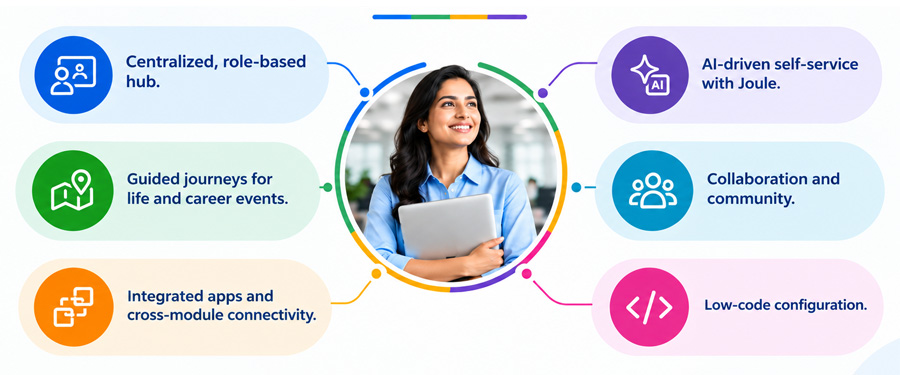
- Centralized, role-based hub. Employees see a workspace based on their role, location, and employee lifecycle stage. A factory supervisor, sales representative, and finance analyst each receive a relevant workspace instead of the same generic portal.
- Guided journeys for life and career events. Onboarding, parental leave, relocation, marital status changes, and offboarding often involve multiple systems and teams. Work Zone brings these activities into guided journeys with clear steps and relevant information across SAP and non-SAP processes.
- Integrated apps and cross-module connectivity. Work Zone connects with SuccessFactors modules such as Employee Central and Learning. UI Integration Cards and BTP Destinations also bring third-party and custom applications into the employee workspace.
- AI-driven self-service with Joule. SAP Joule brings conversational AI into the employee experience. Employees get answers to routine questions, relevant policies, and guidance on next steps without relying on service desks for every request.
(Claude in SAP SuccessFactors: Joule AI Use Cases & Implementation)
- Collaboration and community. Collaboration hubs and communities help employees connect, share information, and participate in company initiatives across distributed and hybrid workforces.
- Low-code configuration. HR and IT teams can update pages and journeys with less dependency on development cycles. This helps keep the employee experience aligned with changing business needs.
Technical Architecture
Work Zone runs as the Digital Workplace Service within an SAP BTP subaccount. SAP Cloud Identity Services manages authentication and provisioning, while corporate identity providers connect through IAS using SAML 2.0 or OpenID Connect. Role collections control access.
Work Zone uses content federation to bring live content from SuccessFactors, S/4HANA, SAP Business Suite, SAP Enterprise Portal, and third-party systems. UI Integration Cards, BTP Destinations, and custom HTML5 applications extend the workplace experience.
For on-premise systems, SAP Cloud Connector provides secure connectivity to applications within the customer’s data center.
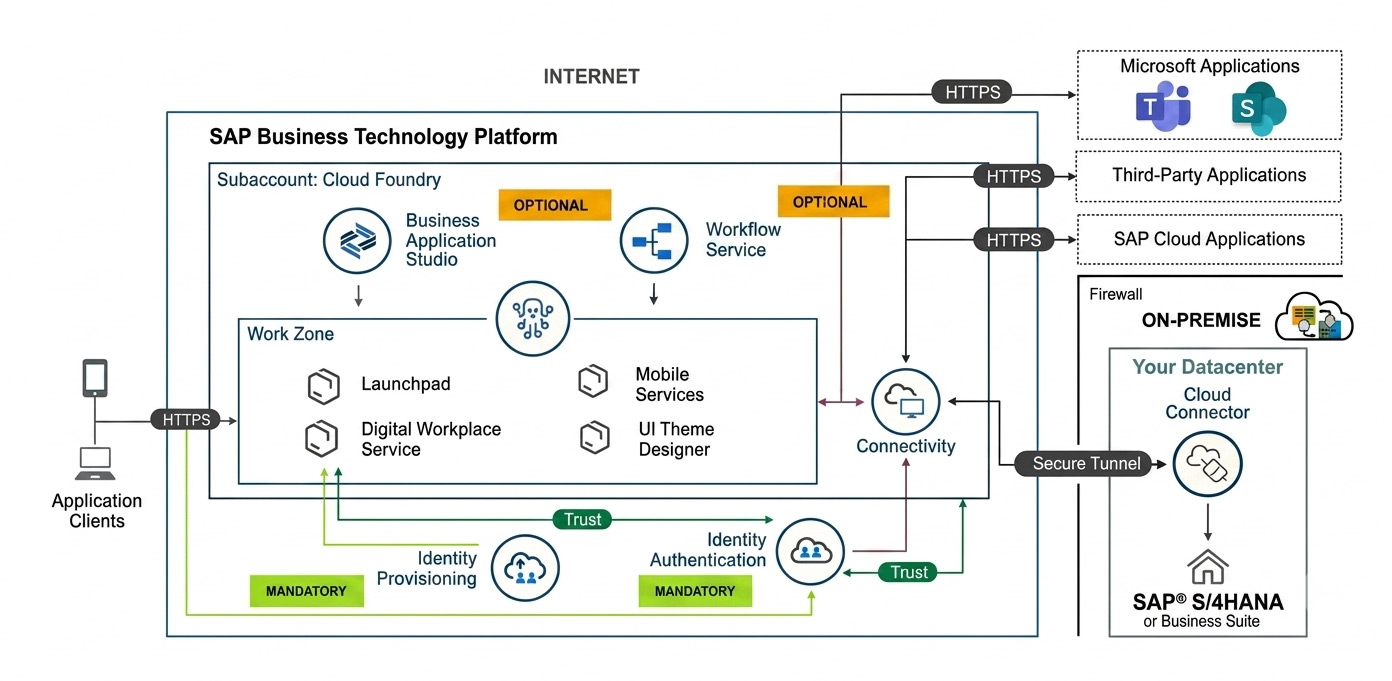 Figure: SAP Build Work Zone technical architecture — subaccount, identity, connectivity, and on-premise integration layers.
Document Grounding: Joule Answering from Your Own Content
Document grounding adds a retrieval-augmented generation layer to Joule. Organizations connect approved content from repositories such as SharePoint, allowing Joule to retrieve relevant company documents when answering employee questions.
For example, an employee asking about leave eligibility receives information based on indexed company policies. Metadata such as location, country, employee type, and department helps tailor responses.
Strong content governance and access design are important before indexing documents. The quality and scope of indexed content directly affect the usefulness of grounded responses.
Service Now Integration
Many enterprises use SuccessFactors as their HR system of record while ServiceNow manages IT and service operations. Integration through SAP Integration Suite or supported connectors helps keep employee, organizational, and task data aligned.
ServiceNow cases and status updates can also surface inside Work Zone through UI Integration Cards. Custom ServiceNow fields often require tailored data mapping to match business processes.
Accessing Work Zone from Mobile Devices
Frontline and field employees often rely on mobile devices rather than desktop systems. SAP’s Joule Work mobile app, renamed from SAP Mobile Start in May 2026, brings Work Zone and SAP Start experiences into a single mobile entry point.
Employees get access to tasks, notifications, search, insight cards, deep links, and Joule-powered assistance. The mobile experience also supports capabilities such as camera access for expense receipts and enterprise mobility controls.
Real Employee Experience Gains
- Fewer logins and less friction. Employees spend less time switching between systems.
- Faster resolution of routine needs. Self-service and guided journeys reduce dependency on HR and service desks.
- More relevant information. Role-based experiences bring priority content and tasks closer to employees..
- Better support during life events. Guided journeys provide clear steps during onboarding, relocation, and leave.
- Better visibility for HR teams. Usage data helps teams identify areas for improvement..
Implementation Considerations
- Start with employee journeys, not features. A technically complete implementation still needs a clear employee experience.
- Establish governance early. Content, applications, and cards need clear ownership to prevent clutter.
- Design security and access early. IAS, IPS, and role collections form the foundation for secure access.
- Plan for continuous improvement. HR and IT teams need an ongoing process for reviewing content, journeys, and usage.
Implementation Expertise: The Role of an SAP Partner Like Applexus
Work Zone brings together SuccessFactors, SAP BTP, enterprise applications, and employee-facing processes. Strong implementation requires experience across these areas and an understanding of the business environment.
Applexus Technologies is an SAP Gold Partner with established experience supporting retail and grocery organizations in the U.S. This includes a multi-year, multi-phase S/4HANA and SuccessFactors engagement for a regional supermarket chain. This experience gives Applexus practical insight into how SuccessFactors fits within a broader retail SAP environment.
Applexus brings dedicated SuccessFactors and BTP capabilities, supported by Application Management Services beyond go-live. Experience with large frontline and hourly workforces, distributed locations, and high-volume employee operations informs its approach to role-based workspaces, mobile access, integrations, and ongoing support.
Applexus brings dedicated SuccessFactors and BTP capabilities, supported by Application Management Services beyond go-live. Experience with large frontline and hourly workforces, distributed locations, and high-volume employee operations informs its approach to role-based workspaces, mobile access, integrations, and ongoing support.
Conclusion
SAP SuccessFactors Work Zone brings HR processes, applications, communications, and AI assistance into one role-based workplace experience. The value comes from reducing the effort employees spend finding information and completing routine tasks.
For organizations focused on employee experience, Work Zone provides a structured approach to connecting people with the systems and information they need. The outcome depends on thoughtful journey design, sound integration, strong governance, and the right implementation partner.